PW Merchant APIPW Merchant APIWooCommerce Google Merchant Center Integration
Başlayın

PW Merchant Check – Free

PW Merchant Check: Free Google Merchant Center Readiness Plugin for WooCommerce

Preparing a WooCommerce store for Google Merchant Center is rarely a single-click task. A store may have attractive product pages and a working checkout while still containing incomplete business information, inconsistent addresses, missing policy details, weak product identifiers, inaccessible pages or product data that does not fully match what shoppers see. These issues can create unnecessary setup difficulties, product disapprovals or policy-review risks.

Google merchant center check

PW Merchant Check is a free WordPress and WooCommerce plugin created to help store owners review those preparation areas before submitting products, requesting an account review or investigating common Merchant Center problems. It works inside WordPress, reads permitted local store information and turns technical or policy-related checks into a structured, beginner-friendly report.

The plugin does not connect to a Google account, does not require a Google API credential and does not send store audit data to Poyraz Web or PW Feed. It is designed as a local preparation and risk-review tool. It cannot approve a Merchant Center account, remove a suspension or replace Google’s own diagnostics. Its purpose is to help merchants identify visible issues that deserve attention before they take the next step.

Why Merchant Center preparation requires more than a product feed

Many e-commerce businesses begin by focusing only on product submission. They prepare a feed, connect a platform and expect products to appear. Product data is important, but it represents only one part of the merchant experience. A customer must also be able to understand who operates the store, how to make contact, what shipping costs and delivery times apply, how returns work, what happens after payment and whether the information shown across the website is consistent.

Google’s official Merchant Center guidance and product data specifications emphasize accurate product information. Price, availability, identifiers, landing-page content and policy details should reflect the real offer. Return information submitted to Merchant Center should also match the policy shown on the website. When the site, WooCommerce settings and Merchant Center describe the same business or offer differently, the merchant should investigate the difference rather than repeatedly submitting the account for review.

This is especially relevant for WooCommerce stores serving customers in Türkiye. A business in İstanbul, Ankara, İzmir, Bursa, Antalya, Konya, Adana, Gaziantep or another city may display its address in several locations: WooCommerce settings, the contact page, the footer, legal pages, invoices, payment records and Merchant Center. Differences in the business name, district, street, city or postal code can confuse both customers and automated systems. PW Merchant Check makes this consistency problem visible in a practical way.

What PW Merchant Check is

PW Merchant Check is a completely free Merchant Center readiness and WooCommerce audit plugin. It adds a dedicated administration menu containing a beginner guide, site audit, product audit, misrepresentation preparation review, reports and controlled settings.

There is no trial period, paid feature lock, licence quota or Pro-only audit. The plugin can be used without creating a remote account. It follows the active WordPress administration language and includes English source strings, a complete Turkish translation and a WordPress-compatible translation template for additional community languages.

The plugin is useful for new merchants, established WooCommerce stores, agencies, developers and support teams. A beginner can follow the setup guide step by step. A store manager can check products in controlled batches. An agency can download a local HTML report and discuss the findings with a client. A developer can use the results as a preparation checklist without granting the plugin access to a Merchant Center account.

What the plugin checks

PW Merchant Check groups its checks into clear areas rather than presenting one unexplained score. The local site audit reviews WordPress and WooCommerce settings that can affect store readiness. The product audit reads published WooCommerce products in controlled groups of 100. The misrepresentation section combines automatic checks with merchant declarations. The report page brings the latest available results together.

The local site audit can review:

  • Whether the public site address uses HTTPS.
  • Whether WordPress discourages search-engine visibility.
  • Whether readable permanent links are configured.
  • Whether WooCommerce is active.
  • Whether the shop, cart, checkout and account pages are assigned and published.
  • Whether privacy and terms content can be found among published pages or posts.
  • Whether return, refund, shipping and delivery topics can be detected.
  • Whether the WooCommerce store address, city and postal code are completed.
  • Whether important address components and contact methods can be detected on the contact page.
  • Whether a store currency is configured.

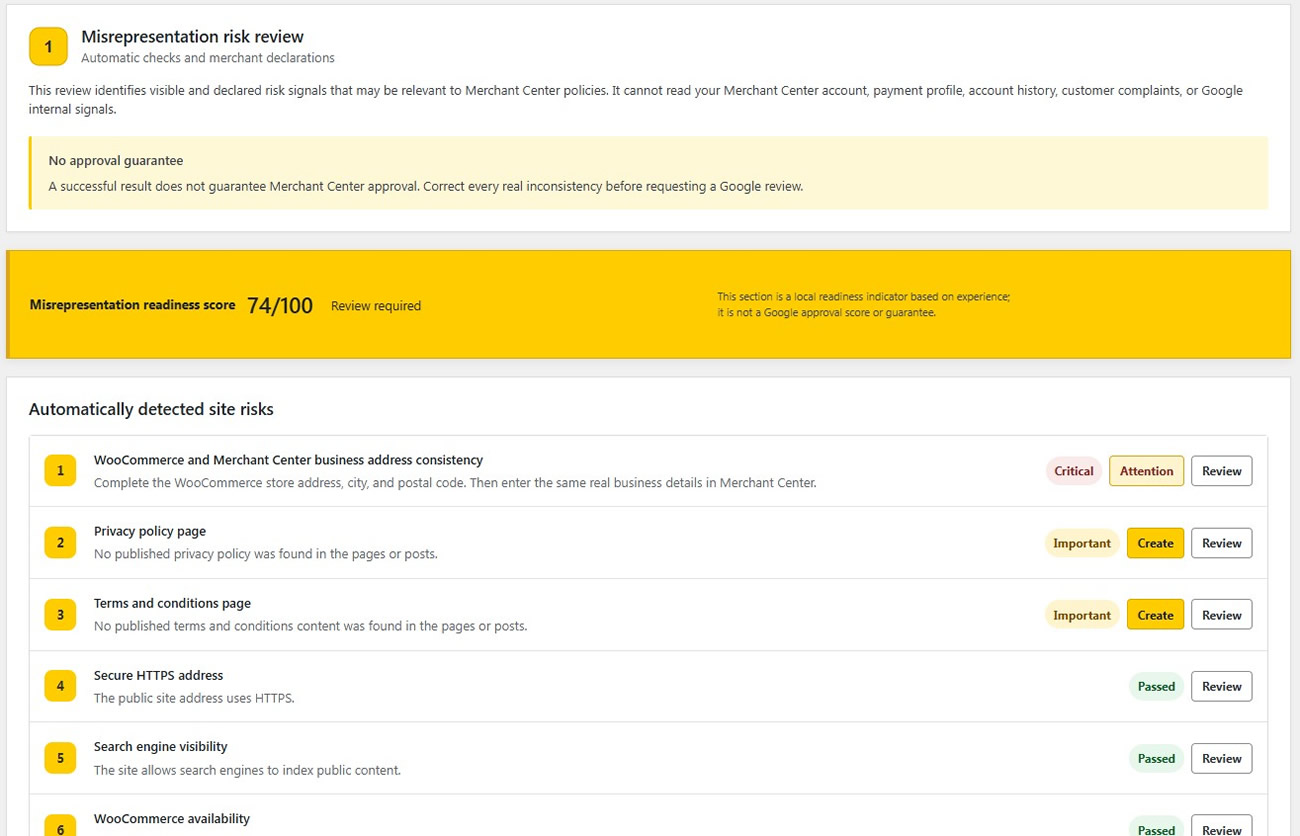
These checks are intentionally presented with status levels such as Critical, Important, Suggestion and Passed. Critical does not mean that Google has rejected the store for that exact reason. It means that the detected condition deserves priority because it can affect the ability to understand, access or purchase from the store.

Business address and contact consistency

The WooCommerce business address is one of the most important values in the audit. A complete address should not exist only in the WordPress database. Customers should be able to find accurate business and contact information on the website, and the merchant should compare it manually with the business information entered in Merchant Center.

PW Merchant Check reads the configured WooCommerce address, city and postal code, then looks for relevant values on a published contact page. It also checks for visible email and phone signals. If a value cannot be detected, the plugin lists the items that should be reviewed.

This is a preparation check, not an identity-verification service. Page builders, maps, images, widgets, scripts or unusual formatting can prevent automatic text detection. A merchant should always open the contact page as a customer, examine the footer and compare the visible information with WooCommerce, Merchant Center and real business records.

For a Türkiye-based e-commerce site, consistency should include the genuine business name, neighbourhood or district where relevant, street information, province, postal code, phone number and customer-support email. The purpose is not to repeat keywords or create artificial local signals. The purpose is to present one real business identity consistently to customers in Türkiye and any other target country.

Policy-page preparation checks

A policy page should do more than exist. It should explain the process that the store actually follows. PW Merchant Check searches published pages and posts for common privacy, terms, returns, refunds, shipping and delivery signals. When it finds a relevant page, it checks whether basic customer-information topics are visible.

For return and refund content, the plugin looks for topics related to the return period, return conditions, refund process and contact method. For shipping and delivery content, it looks for delivery time, shipping cost, service area and contact method. Missing topics are shown for manual review.

The check is keyword based and may not understand every legal expression, translation or custom layout. It does not generate a policy, determine legal compliance or replace advice from a qualified legal professional. Store owners remain responsible for ensuring that policy pages accurately reflect their products, operations, customer rights and applicable laws.

Policy information should also remain consistent with Merchant Center settings. If a website promises free returns within a stated period while the account describes a different return window or customer-paid return shipping, the merchant should correct the inconsistency. Google’s official return guidance states that submitted return values should match the return policy indicated on the website.

Controlled WooCommerce product audit

Large catalogues require a careful approach. Loading every WooCommerce product in one request can place unnecessary pressure on a shared hosting account. PW Merchant Check therefore reads published products in controlled groups of 100 while the Product audit page remains open. A progress bar shows how many products have been scanned and how many remain.

The audit is read only. It does not change product titles, descriptions, prices, stock, images, categories, attributes or variations. Store owners can select a low-load, balanced or faster interval between batches. The balanced option is the recommended default.

The product audit checks common catalogue conditions, including:

  • Products without a price.
  • Products without a featured image.
  • Products without a usable description.
  • Products without a category.
  • Products without an SKU.
  • Products without a detected global unique identifier.
  • Products without a detected brand taxonomy.
  • Product titles longer than the configured preparation threshold.
  • Variable products without variations.
  • Published products that WooCommerce does not consider purchasable.

A missing GTIN or brand is presented as a suggestion because not every product uses the same identifier structure and stores may keep brand data in different taxonomies or custom fields. The result is a prompt to investigate, not an automatic declaration that the product violates a Google policy.

Product examples are shown in expandable review panels. Product names remain exactly as entered by the merchant; they are store content, not plugin-interface translations. Audit headings and messages follow the current WordPress administration language.

Misrepresentation readiness review

Misrepresentation is a serious Merchant Center policy area. PW Merchant Check does not claim to diagnose Google’s internal decision or reveal a hidden suspension trigger. Instead, it provides a structured preparation review based on visible site conditions and answers supplied by the merchant.

The section asks practical questions about the real operation of the store. Is the return and refund process genuine and working? Is it configured accurately in Merchant Center? Are business details consistent? Is checkout functional? Are shipping details realistic? Does the store contain placeholder content or broken elements?

Answers affect a local preparation score. Automatic site checks can also contribute to that score. The score is deliberately accompanied by a warning: it is an experience-based, local readiness indicator; it is not a Google approval score or guarantee.

A merchant should use a low score to organize work, not to panic. A high score should not be treated as permission to ignore Merchant Center diagnostics. The correct approach is to inspect every critical item, confirm all declarations honestly and review the live customer journey before requesting any formal review.

Reports and audit history

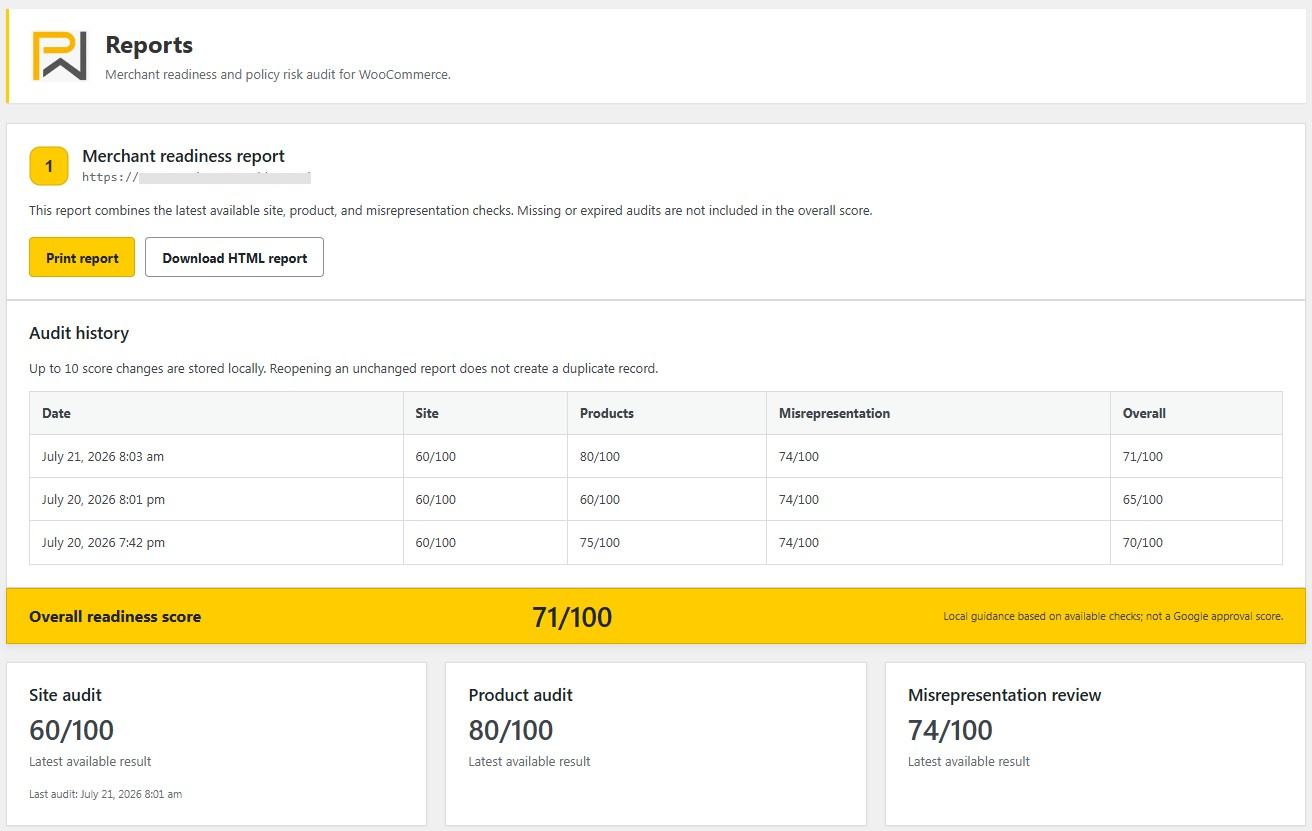
The Reports section combines the latest available site, product and misrepresentation scores. Store owners can choose which sections contribute to the overall readiness score. The report can be printed or downloaded as a standalone HTML file directly in the browser.

No external PDF or reporting service is used. The HTML report is created locally from the visible report content. A limited history stores up to ten score changes in the WordPress database. Reopening an unchanged report does not create duplicate history records.

This makes the report useful for internal preparation. An e-commerce team can run the initial audit, correct address or policy issues, scan the products again and compare the new score. An agency can share the HTML report with an authorized client. The history is intentionally limited so that the plugin does not create an uncontrolled database table.

Public audit for another website

PW Merchant Check can perform a limited public-homepage audit for another website when an authorized administrator explicitly enters its address. This feature checks only public HTML signals such as HTTPS, page availability, title, noindex directives, contact or policy links, canonical information and common structured-business data.

The request is protected with strict limits. Local and private network targets, credentials in URLs, non-standard ports, unsafe addresses, oversized responses and non-HTML content are blocked. The feature does not sign in, submit forms, add products to a cart or access private settings.

This limited check can help an agency perform an initial public review, but it is not equivalent to the comprehensive local WordPress audit. A site owner should install the plugin on the WooCommerce store to review private settings that are available only inside WordPress.

What PW Merchant Check does not do

Clear limits are essential for an honest Merchant Center tool. PW Merchant Check does not:

  • Connect to a Google or Merchant Center account.
  • Request OAuth permission.
  • Read account-level diagnostics, product disapprovals or suspension details.
  • Create, update or delete products in Merchant Center.
  • Submit a review request.
  • Guarantee product visibility, account approval or suspension removal.
  • Provide legal advice.
  • Send local audit results to Poyraz Web or PW Feed.

Merchants who need direct account connection, product synchronization or Merchant API diagnostics require a different solution. PW Merchant Check is intentionally focused on free, local, pre-submission preparation.

Who should use the plugin

PW Merchant Check is suitable for WooCommerce store owners preparing a new Merchant Center account, merchants investigating general readiness after a warning, agencies reviewing client stores, developers completing an e-commerce project and support teams that need a repeatable checklist.

It can be especially valuable for small and medium-sized businesses across Türkiye that do not need an API integration but want clearer guidance. A local shop in İstanbul, a manufacturer in Bursa, a retailer in Ankara, a tourism-focused business in Antalya or an exporter in İzmir can use the same audit structure while keeping its real business information and customer policies specific to its operation.

The plugin is not limited to Türkiye. Its English source language and WordPress translation structure allow use in other markets. Regardless of location, regional mentions should represent genuine service areas. Adding city names to a page does not replace real local relevance, accurate delivery coverage or a legitimate business presence.

How to begin

  1. Install and activate PW Merchant Check on the WooCommerce website.
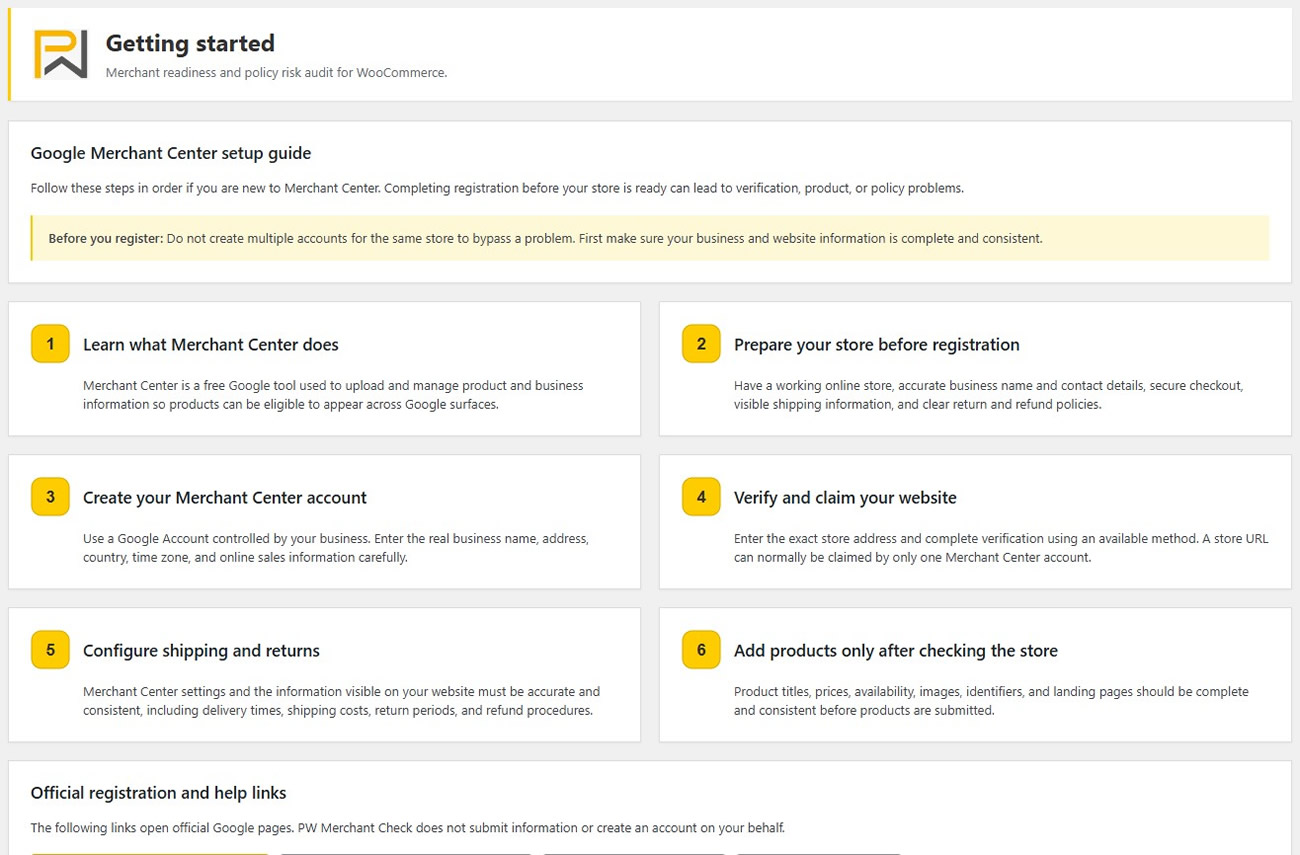
  2. Read the beginner-friendly Merchant Center setup guide.
  3. Run the local site audit.
  4. Review critical address, contact, policy and checkout findings first.
  5. Run the controlled product audit and keep the page open until it finishes.
  6. Correct real catalogue problems without changing accurate data only to improve a score.
  7. Complete the misrepresentation readiness questions honestly.
  8. Open Reports, print or download the result and create an action list.
  9. Compare the website manually with Merchant Center business, shipping and return settings.
  10. Use Google’s own diagnostics and official guidance before requesting a review.

Store owners can begin with Google’s official Merchant Center getting-started guidance, review the official misrepresentation policy and consult the product data specification. These sources should take priority whenever requirements change.

Frequently asked questions

Is PW Merchant Check free?

Yes. The plugin is completely free. It does not contain a trial period, feature quota, paid unlock or Pro-only audit.

Does the plugin require a Google API connection?

No. Local site, product and preparation checks work without Google API credentials or Merchant Center account access.

Can PW Merchant Check remove a misrepresentation suspension?

No. It can identify preparation issues visible to the plugin, but only Google determines Merchant Center policy status. The merchant must correct real problems and follow Google’s official review process.

Does a high readiness score guarantee approval?

No. The score is a local preparation indicator based on available checks and merchant answers. It is not a Google approval score or guarantee.

Does the product audit change WooCommerce products?

No. The audit is read only. It does not change product content, prices, stock, images, categories, identifiers or variations.

Why does a product appear under missing brand?

The plugin checks common WooCommerce brand taxonomies. A store may keep brand data in another attribute or custom field. The result is a suggestion to review the product, not proof that the product is invalid.

Why can the contact-page check miss an address?

The address may be created by a page builder, widget, image, map or script rather than stored as ordinary page text. The merchant should always perform a visual comparison.

Can the plugin create missing policy pages?

When a required page cannot be found, the plugin can direct an administrator to the WordPress Add New Page screen. It does not automatically generate legal text.

Does the plugin send audit results outside the website?

No. Local summaries and limited history remain in the WordPress database. The optional external-site audit sends a protected request only to the public website address explicitly entered by an authorized administrator.

Can agencies use PW Merchant Check?

Yes. Agencies can run authorized local audits, prioritize findings and provide a downloadable HTML report. They should still explain the limits of automatic checks and avoid promising Google approval.

Is PW Merchant Check developed by Google?

No. PW Merchant Check is an independent plugin. It is not developed, endorsed or approved by Google.

Final preparation note

A successful Merchant Center setup begins with a real, functional and transparent e-commerce operation. No plugin can replace accurate business information, genuine customer service, a working checkout, realistic shipping and return processes or consistent product data. PW Merchant Check helps WooCommerce merchants organize those checks in one place and discover issues that may otherwise be overlooked.

Use the plugin before product submission, after major store changes and before requesting a policy review. Correct the underlying issue rather than editing text only to satisfy an automated score. When the website, WooCommerce settings, Merchant Center information and real business operation all describe the same offer clearly, customers receive a more trustworthy experience.

Download PW Merchant Check

Download the free PW Merchant Check plugin from its official distribution page, install it on an authorized WooCommerce website and begin with the local site audit. For support and future language resources, use only the official PW Merchant Check, Poyraz Web or PW Feed channels shown on the distribution page.